Download Sheet Music Software
We are currently unable to support your browser and OS. Instead, we are showing you all of the available software options for different browsers and OSs.
For Windows
The free Musicnotes Player + Viewer allows you to view, purchase, download, interact with and print Musicnotes sheet music files.
Windows Version 1.40.3 | 2551 KB
Detailed Installation Instructions
Step 1 - Download the Musicnotes Player
Your download should begin automatically.
To begin installation of the Musicnotes Player, please click on the link below to download the Player installer.
If your download hasn't already started,
click here to download the Musicnotes Player
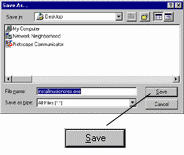
When prompted,
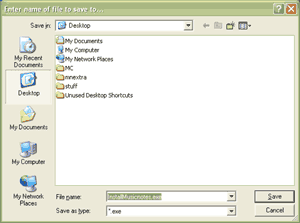
select the Save
option, and save the file to your Windows Desktop.
Example:
Step 2 - Start Installer
Next,
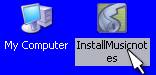
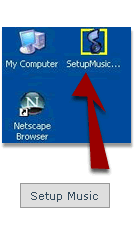
switch to your windows desktop and double-click the icon "InstallMusicnotes.exe".
Example:
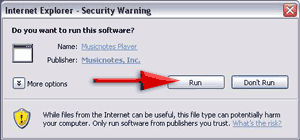
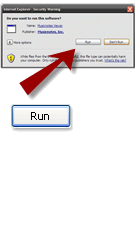
On the next prompt, click the Run
Example:
Step 3 - Install the Musicnotes Player Software
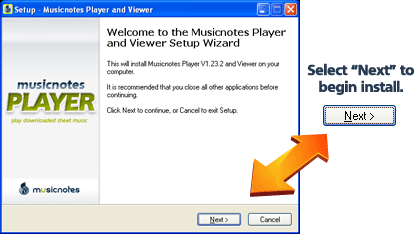
Click the "Next" button on the "Welcome to the Player Setup Wizard" screen.
Example:
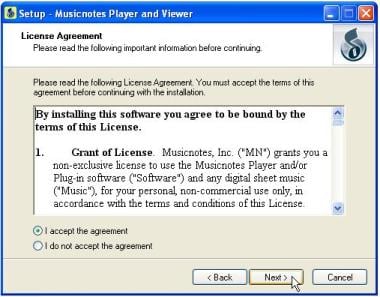
Read the License Agreement. If you agree, choose the "I accept the agreement" option and the click the "Next" button.
Example:
Select the default options on the following windows that appear during installation and press "Next" or "Install" until installation is complete.
Once you've successfully completed installation of the Player software, it's time to start playing your music!
More about the Musicnotes Player + Viewer
Why do you need it?
The Musicnotes Player is also required to sync (download) your purchased Musicnotes sheet music files.
What are the benefits? free previews and instant download
and printout of nearly 100,000 digital sheet music and guitar tab titles.and your music is always guaranteed "In Stock".
New! Automatically import your purchased sheet music with the new "Sync" feature.
Adjust the playback tempo.
Select specific instruments or phrases.
Access an interactive music encyclopedia.
Player also includes FREE sheet music for the following five songs:
"Valse (Op. 64 No. 3)" by Frederic Chopin
"Capriccio (Morning Butterfly) (Op. 76, No. 1)" by Johannes Brahms
"First Progressives Lessons for the Guitar No. 3" by Mauro Giuliani
"Hello! Ma Baby" by Howard and Emerson
"Presto: the fourth movement of Divertimento No. 14, K.V. 270" by Wolfgang Amadeus Mozart
The free Musicnotes Viewer allows you to view, purchase and print Musicnotes sheet music files.
64-bit XP/Vista Version 1.20.0 | 299 KB
Version 1.20.0 | 283 KB
64-bit XP/Vista Version 1.20.0 | 273 KB
Version 1.20.0 | 269 KB
Detailed Installation Instructions
Step 1 - Download the Musicnotes Viewer
Your download should begin automatically.
To begin installation of the Musicnotes Viewer, please click on the link below to download the Viewer installer.
If your download hasn't already started,
click here to download the Musicnotes Viewer
When prompted,
select the Save
option, and save the file to your Windows Desktop.
Example:
Step 2 - Start Installer
Next,
switch to your windows desktop and double-click the icon "".
Example:
On the next prompt, click the Run
Example:
Step 3 - Install the Musicnotes Viewer Software
Read the License Agreement. If you agree, choose the "I agree" option.
Example:
Select the default options on the following windows that appear during installation and press "Next" or "Install" until installation is complete.
Once you've successfully completed installation of the Viewer software, it's time to start playing your music!
More about the Musicnotes Viewer
Why do you need it?
What are the benefits? free previews and instant download
and printout of nearly 100,000 digital sheet music and guitar tab titles.and your music is always guaranteed "In Stock".
For Mac
The Musicnotes Viewer for Mac allows you to view and purchase Musicnotes sheet music files.
OS10.2.8 or later Version 1.19.0 | 884 KB
OS10.1.5 to 10.2.7 Version 1.14.4 | 202 KB
OS9 (or earlier) Version 1.14.4 | 405 KB
Detailed Installation Instructions
Your download should begin automatically.
To begin installation of the Musicnotes Viewer, please click on the link below to download the Viewer installer.
If your download hasn't already started,
click here to download the Musicnotes Viewer
When prompted,
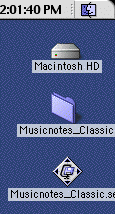
select the Save option, and save the file to your Desktop.
Example:
Step 2 - Start Installer
You should already have the folder : Otherwise, first double-click the "" file to make the folder. )
Example:
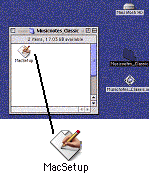
Double-click the MacSetup
icon. The Viewer installer will take care of the rest
Example:
Step 3 - Install the Musicnotes Viewer Software
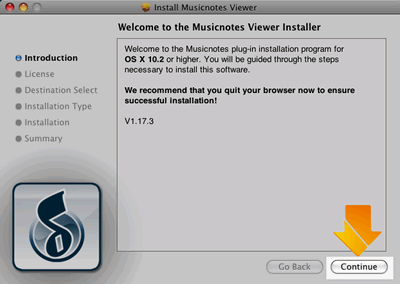
Click the "Next" button on the "Welcome to the Viewer Setup Wizard" screen.
Example:
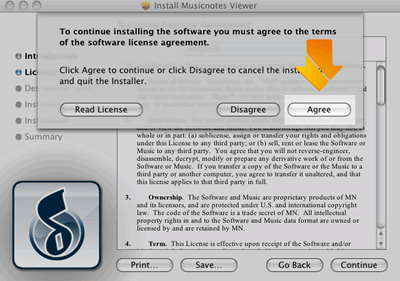
Read the License Agreement. If you agree, choose the "I Agree" option.
Example:
Select the default options on the following windows that appear during installation and press "Next" or "Install" until installation is complete.
Close and Quit your browser before trying to get your music.
Once you've successfully completed installation of the Viewer software, it's time to start playing your music!
More about the Musicnotes Viewer for Mac
Why do you need it?
What are the benefits? free previews and printout of nearly 100,000 digital sheet music and guitar tab titles.and your music is always guaranteed "In Stock".